Your account


Your cart is sadly empty

Register a product

Newsletter

New MediaMaster 2.0

Express or Pro?
Scale it to your needs!

Download Upgrade


ArKaos is Recruiting

Help us define the future of video technology!

Join the team!

 
ArKaos VJ DMX
From
699€

ArKaos VJ DMX

Control ArKaos VJ and all your
other DMX compatible equipment

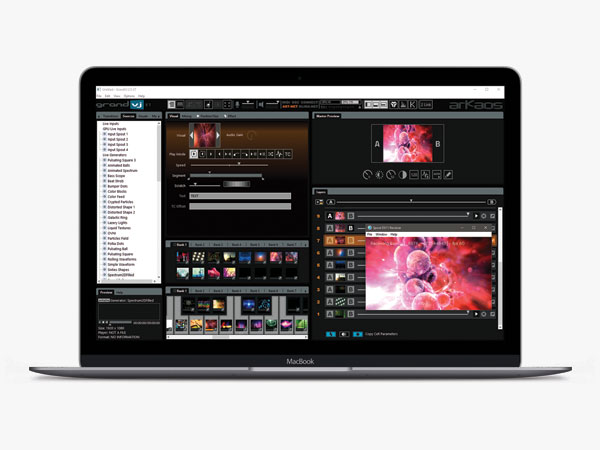
ArKaos VJ DMX can be controlled with small or hi-end DMX consoles and allows a smooth integration of videos into light shows, theater and performances. it will enable you set up outstanding video shows in a matter of seconds. Build a full performance using only a few simple video loops from your hard drive, mixing and altering them using more than 100 real-time effects.


Take control of your show

ArKaos VJ DMX lets you control every aspects of your live visual show from within your console: assign visuals to be displayed, trigger effects, use camera inputs, drive effect parameters… all of this live and directly from your sliders and buttons. You can now seamlessly integrate a professional video control system into your existing lightshow architecture.

Connection diagram

Real time high quality visuals

ArKaos VJ DMX takes advantage of graphic card acceleration through its Hardware Accelerated video engine which produces an unprecedented visual smoothness and image quality and makes it possible to rotate, zoom and change the color for each layer in real time from the DMX Fixture Control Mode.

Tons of effects, so many parameters

On top its 60+ original effects or 40+ Hardware Accelerated effects, ArKaos VJ DMX supports additional FreeFrame effects (an open cross-platform real-time video effects plug in standard) and comes shipped with 42 pre-loaded FreeFrame effects!

Preview from the lighting desk

ArKaos VJ DMX makes it possible through a simple network connection to see the file names and thumbnails of your visuals and monitor the output directly from the lighting desk thanks to the  MSEX protocol (Media Server EXtension) which has been implemented in collaboration with Capture, ETC and Chamsys.

In order to adapt to an even wider range of consoles, ArKaos VJ DMX features two different DMX control modes:

  • Simple Control Mode
    This mode is targeted to low-end consoles. It allows triggering pre-defined setups of visuals & effects using dimmers. Even a simple 24 faders controller is enough to control your visuals in this mode!
     
  • Fixture Control Mode
    Targeted to professional DMX consoles, the Fixture Control mode transforms your computer into a full-fledged media server. When enabled, eight video layers are available and you can control the visual & effect selection, position, scaling, rotation, RGB levels, effect parameters, Chroma/Luma keying … for each layer directly from your console!

Multiscreen and widescreen with Soft-Edge

ArKaos VJ DMX allows to define a custom output resolution allowing - from a single computer! - to output your visuals on multiple screens (i.e. different visuals on separate screens) or on a wide screen (i.e. a large visual on several screens next to the other) with a Soft-Edge option for seamless blending between the screens.

Output to LED Panels in a few clicks

A LED Mapper extension is available for ArKaos VJ DMX, it allows mapping of the server's video output directly to any configuration of LED panels without additional hardware to convert video signal into DMX signal.

Flexible and powerful, yet so affordable

Ours solutions offer much more flexibility than most hardware media servers while lowering your costs since most recent low cost computers are capable of playing high quality video; triggering ArKaos visual effects from a DMX lighting console offers the ease of a simple and inexpensive setup to control both your projection screens and your light show.

ArKaos VJ is multi-lingual

ArKaos VJ is availible in English, French, German, Italian and Spanish versions. At the installation, choose your language for menus and texts.

Technically, how does it works?

To connect a DMX control machine to a PC running ArKaos, you can use either the ArtNet Ethernet protocol or a DMX-USB interface:

  • The ArtNet protocol
    ArtNet is a public domain DMX protocol developed by Artistic Licence. This is the first public domain DMX through network protocol and it is compatible with several DMX consoles and lighting devices.

    The manufacturers of those consoles have formed the "ArtNet Alliance" and they are listed on the Artistic Licence web site. If your DMX controllers does not have native ArtNet support you can purchase converters such as the Up-Lynx UK).

    Using your computer to send or receive ArtNet DMX data to compatible DMX controllers requires nothing more than a basic Ethernet network adapter, so it is compatible with Mac and PC platforms.
     
  • The Enttec DMX-USB Pro Widget
    If your DMX control machine does not support the ArtNet protocol, you can use a DMX-USB interface to send DMX signal from the console to the computer, we recommend to use the DMX USB Pro widget developed by Enttec. It is PC & Mac compatible and benefits from a hardware buffer to guarantee the stability of the DMX signal received, it also provides a convenient DMX THRU connection to easily include ArKaos on your DMX line.

Check out the "Configuration" page to see how to configure DMX communication in ArKaos VJ DMX through a DMX-USB interface or through the ArtNet protocol or read the Release Notes PDF document (in your software installation folder) for detailed configuration explanations and a complete list of the settings and commands.